








This fixes the problem!
PowerShell way: Setting “RichText” property of the field to True makes SharePoint 2013 document library field rich text enabled!

ESPC Amsterdam26
RAI, AMSTERSAM, 30 NOV - 03 DEC, 2026
European Power Platform Conference
BELLA CENTER, COPENHAGEN, 29 JUN - 02 JUL 2026
European Microsoft Fabric + SQL Community Conference
BARCELONA, SPAIN, 28 SEP - 01 OCT, 2026


Could not add rich text columns to SharePoint document library, Picture Library and other type of Libraries!
Little background: End user created in document library with type “Description” column as “Multiple lines of text”and expecting this column to is expecting to have the Rich text capability. so, tried editing the column, and found no option to update the type of this column as rich text!
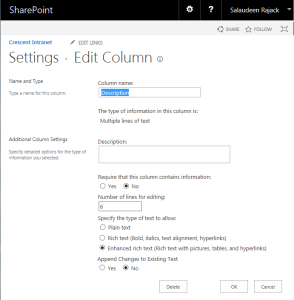
When you add a Multiple lines of text field to custom list, announcement, tasks, etc, You’ll find the Rich text and Enhanced rich text options.
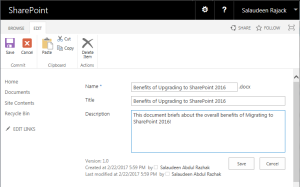
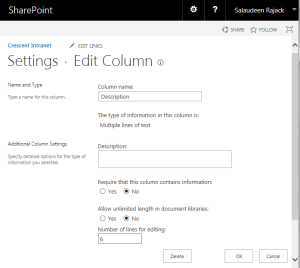
However on document libraries, these options seems missing! It just displays a Text area without any formatting! It seems you can’t have a rich text column in a document library with SharePoint 2013. So, How do we create Rich Text column for a Document Library?
While there are many options to get rich text field in SharePoint 2013 document library like: Custom field types, Content Types, etc, here is the easiest way:
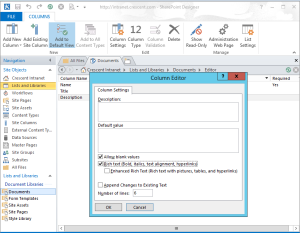
This fixes the problem!
PowerShell way: Setting “RichText” property of the field to True makes SharePoint 2013 document library field rich text enabled!
Add-PSSnapin Microsoft.SharePoint.PowerShell -ErrorAction SilentlyContinue

$SiteURL = "http://intranet.crescent.com/"
$ListName="Documents"
$FieldName="Description" #Internal Name

$Web = Get-SPWeb $SiteURL
$List = $Web.Lists[$ListName]
$Field = $List.Fields[$FieldName]
$Field.RichText = $True
$Field.Update()
I know this issue exists in all SharePoint versions: Including SharePoint 2007, SharePoint 2010, SharePoint 2013 and even in SharePoint 2016! and Yes, It’s weird and I’m not sure why Microsoft hasn’t fixed this issue yet!
Rajack, S. (2017). Rich Text Column in SharePoint Document Library. [online] Sharepointdiary.com. Available at: http://www.sharepointdiary.com/2017/02/rich-text-column-in-sharepoint-document-library.html [Accessed 2 Jun. 2017].


