






Unlocking Dataverse Functions

Contents
Introduction
We low-code developers share a common goal: we want to code less but achieve more. For years, extending business logic in the Power Platform meant either diving into full C# plugins or creating complex JavaScript web resources—both requiring pro-code skills that many makers don’t have (or want to develop).
Enter Dataverse Functions. These powerful low-code capabilities let you extend your business logic without writing a single line of C# code. Instead, you use familiar Power Fx expressions to create reusable, performant, and maintainable logic that works across your entire Power Platform ecosystem.
In this blog, I’ll walk you through what Dataverse Functions are, why they matter, and how you can start using them today to level up your Power Platform solutions.
What are Dataverse Functions?
Before we dive deep, let’s clarify the landscape. When we talk about extending Dataverse, we have
- Business Rules – Simple, UI-based rules
- Workflows and Cloud Flows – Process automation
- Calculated Columns – Formula-based fields
- Plugins – Advanced business logic extensions
Plugins come in two flavors:
- Full Code Plugins – Traditional C# plugins requiring Visual Studio, deployment, and maintenance
- Low Code Plugins – What we’re focusing on today
Low-code plugins have evolved into two distinct types:
Automated Plugins: Event-Driven Logic
Triggered automatically when something happens to a Dataverse table (create, update, or delete operations). Think of these as “event-driven” logic that runs whenever data changes.
Functions (formerly Instant Plugins): On-Demand Logic
Triggered on-demand, like custom APIs. These can:
- Accept input parameters
- Process data from multiple tables
- Return custom outputs
The game-changer? You can use them across:
- Canvas Apps
- Model-Driven Apps
- Power Automate flows
- Copilot agents
Why should you care?
Let me break down the benefits:
1. Readable and maintainable
As a low-code developer, I can read and understand Power Fx functions far better than C# plugins.
Refactoring? Easy.
Understanding what a function does six months later? No problem.
2. Performance boost
Functions run server-side in Dataverse, not in your browser.
This means significantly better performance in your Canvas Apps compared to doing complex calculations client-side.
3. Reusability across the platform
Create once, use everywhere:
- Canvas Apps
- Model-Driven Apps
- Power Automate flows
- Copilot agents (yes, really!)
4. No More Duplicate Logic
Stop maintaining the same business rule in five different places.
One function, one source of truth.
Automated Plugins: Event-Driven Logic
These require the Dataverse Accelerator App, which you can install from the Power Platform Admin Center.
Scenario: Date Validation
You’re building a grant management system. Users enter a start date and end date. The end date can’t be before the start date.
Creating the automated plugin:
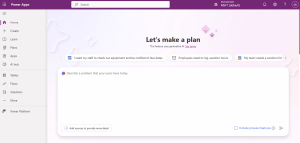
1. Open the Dataverse Accelerator App:
2. Create a new automated plugin
3. Choose your trigger: Create, Update, or Delete
4. Write your Power Fx logic:
If(
'End Date' < 'Start Date',
Error({Kind: ErrorKind.Validation, Message: "End date must be after start date"})
)
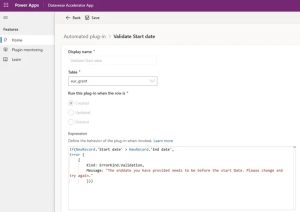
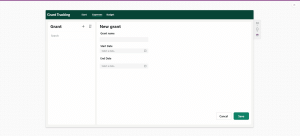
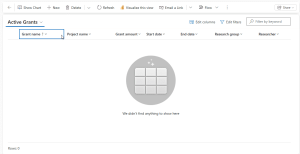
The magic: This validation now works automatically in both Model-Driven Apps and Canvas Apps. No duplicate code. No forgetting to add validation in one place. Just consistent, reliable business logic.
In Canvas App:
In Model Driven App:
Other Ideas:
- Automatic naming conventions: Companies often have naming conventions—document IDs, project codes, etc. Instead of relying on users to follow a manual guide, create an automated plugin that renames records automatically. Example: A record titled “New Brand” is renamed to “BRAND-2025-001-Product Name” based on your company’s conventions. The user doesn’t need to remember the format—it just happens.
- Populate a log row in a separate log table
Functions: On-Demand Power
Unlike automated plugins that react to data changes, functions run when you explicitly call them.
Functions can be added to solutions, meaning you can use pipelines to deploy functions across environments.
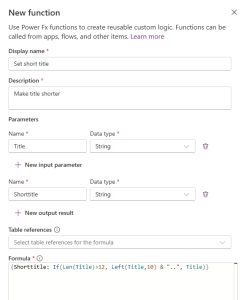
Scenario: Shortening titles
You need to create abbreviated versions of product titles for display in tight spaces.
// Input: Title (string) // Output: Shorttitle (string)
{Shortentitle: If(Len(Title)>12, Left(Title,10) & "..", Title )}
Using in Canvas Apps
Add the Environment table as a data source
Call your function in a button’s OnSelect:
Set(
varShortTitle,
Environment.ShortenTitle({Title: TextInput_ProductTitle.Text}).ShortTitle
)

Using in Power Automate
Add an “Unbound Action” step. Select your function name. Pass the title as input. Receive the shortened version as output.
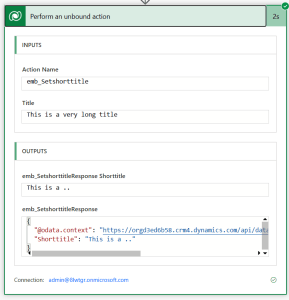
One function. Multiple platforms. Zero duplicate code.
Monitoring and Debugging
Dataverse Functions offer strong debugging features.
Monitor Sessions (Canvas Apps)
Your monitor session shows:
- Inputs sent
- Outputs received
- Execution time
- Errors
A function in a monitoring session:

Trace Logging
Use Trace() statements for in-depth debugging:
Trace("Processing started for: " & Title);
// Your logic here
Trace("Processing completed. Result: " & ShortTitle);
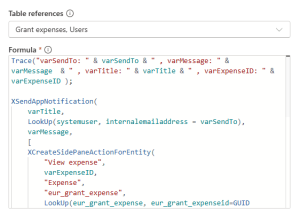
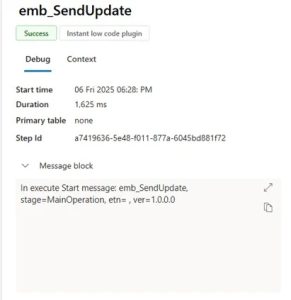
View trace logs in:
- Dataverse Accelerator App’s Plugin Monitor
- Plugin Trace Viewer in XRM Toolbox
- Power Platform Environment settings app
Important limitations to know
Some things are not (yet) possible with functions:
- ❌ UI Interactions (e.g. navigating screens, showing popups)
- ❌ Limited Connectors (only Microsoft connectors supported)
- ❌ External APIs (limited support)
- ❌ Some Power Fx Functions (e.g. Set(), UpdateContext(), Patch())
Use Power Automate or app logic in these cases.
The Decision Matrix
| Use case | Use this |
|---|---|
| Validation on every data change | Automated Plugins |
| Reusable on-demand logic | Functions |
| Complex integrations, external APIs | Power Automate |
Conclusion
Dataverse Functions represent a significant leap forward for low-code developers.
You no longer have to choose between simplicity and power, you can have both.
Start small: Pick one business rule you’re duplicating across apps. Convert it to a function. Experience the joy of editing logic once and seeing it update everywhere.
As low-code developers, we now have pro-code capabilities without writing pro-code. We can code less and achieve more.
Source
Burgers, E (04/02/2026) Unlocking Dataverse Functions. Unlocking Dataverse Functions – Burgers & Bytes
Tags
trending posts


