






Geolocation in Power Apps: Translating Addresses and Validating Check-Ins

Contents
Introduction
Hi Everyone, I’m back, and today, we will learn how to implement translating addresses to longitude and latitude (using Azure Maps API) and validating check-ins. For example, there will be a plan for the Salesperson to go to location X for Customer A. On the day itself, the Salesperson can check in on the Client Office, and the Sales Manager can verify if the visitation is valid.
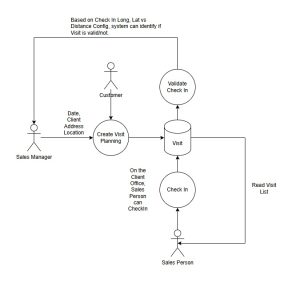
Based on the above scenario, what we need to do:
- Create an Azure Maps Account (I don’t think I need to show how to create this, as the creation is very straightforward. Once the resource is created, go to Settings > Authentication > Shared Key Authentication > copy the Primary Key and keep it for later usage.
- Create a custom table named Visit (Activity Table) with several attributes.
- Create two Plugins.
- Create a Canvas App to show the two points (shout out to Matthew Devaney with this blog post)
Without further ado, let’s go!
Visit Table
To let the Sales Manager upload/create records for Visit Planning, we need to create a custom table. But we will use the Activity table like the screenshot below:
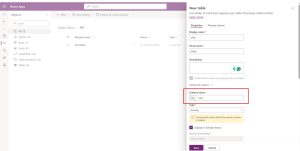
Create an activity table to store location data
Once created, I created the following custom attributes:
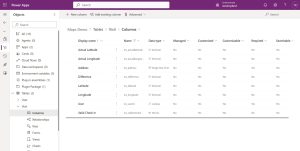
As you can see in the above screenshot, I created a lookup attribute and set it to System User (to allow the Sales Manager to set the Salesperson of the visit).
Environment Variables
I also created 3 Environment Variables for these purposes:
| DisplayName | Description | Value |
|---|---|---|
| AzureMapUrl | Azure Map URL that will be invoked for translating the Address to longitude and latitude. As you can see in the Value, the text {address} will be replaced by the Visit.Address on the plugin. |
https://atlas.microsoft.com/search/address/json?subscription-key=YOUR-AZURE-MAP-PRIMARY-KEY&api-version=1.0&query={address} |
| CheckInValidationInKilometers | To validate how many KM differences (planning vs actualization) | 3 (on Kilometers) |
| VisitCanvasAppUrl | The URL of the Canvas App. This will be used to embed the Canvas App into the Model Driven Apps Main Form. As you can see in the value sample, the text {recordId} will be replaced by JavaScript’s function later. |
https://apps.powerapps.com/play/…&recordId={recordId} |
Plugin Code
I created this business logic code:
using Microsoft.Xrm.Sdk;
using Microsoft.Xrm.Sdk.Query;
using System;
using System.Linq;
using System.Net.Http;
using System.Text.Json.Serialization;

namespace MapDemoPlugin.Business
{
    public class TranslateAddress
    {
        public TranslateAddress(ILocalPluginContext context)
        {
            Context = context;
        }

        public void Execute()
        {
            var target = Context.PluginExecutionContext.InputParameters["Target"] as Entity;
            if (target == null) return;

            var azureMapUrl = Context.InitiatingUserService.GetEnvironmentVariableByName("AzureMapUrl");
            if (string.IsNullOrEmpty(azureMapUrl)) return;

            var address = target.GetAttributeValue("ins_address");
            if (string.IsNullOrEmpty(address)) return;

            var addressEncoded = Uri.EscapeDataString(address);
            azureMapUrl = azureMapUrl.Replace("{address}", addressEncoded);

            var client = new HttpClient();
            var request = new HttpRequestMessage(HttpMethod.Get, azureMapUrl);
            var response = client.SendAsync(request).GetAwaiter().GetResult();
            response.EnsureSuccessStatusCode();
            var responseBody = response.Content.ReadAsStringAsync().GetAwaiter().GetResult();
            if (string.IsNullOrEmpty(responseBody)) throw new InvalidOperationException("Response body is empty");

            Context.TracingService.Trace("URL: {0}", azureMapUrl);
            Context.TracingService.Trace("Response: {0}", responseBody);

            var data = System.Text.Json.JsonSerializer.Deserialize(responseBody);
            if (data == null || data.Results == null || !data.Results.Any()) throw new InvalidOperationException("No results found");

            target["ins_latitude"] = data.Results[0].Position.Latitude;
            target["ins_longitude"] = data.Results[0].Position.Longitude;
        }

        public class Response
        {
            [JsonPropertyName("results")]
            public Result[] Results { get; set; }
        }

        public class Result
        {
            [JsonPropertyName("position")]
            public Position Position { get; set; }
        }

        public class Position
        {
            [JsonPropertyName("lat")]
            public decimal Latitude { get; set; }
            [JsonPropertyName("lon")]
            public decimal Longitude { get; set; }
        }

        public ILocalPluginContext Context { get; }
    }

    public class ValidateCheckIn
    {
        public ValidateCheckIn(ILocalPluginContext context)
        {
            Context = context;
        }

        public void Execute()
        {
            var target = Context.PluginExecutionContext.InputParameters["Target"] as Entity;
            if (target == null) return;

            if (!double.TryParse(Context.InitiatingUserService.GetEnvironmentVariableByName("CheckInValidationInKilometers"), out var rangeValidation)) return;

            var currentRecord = Context.InitiatingUserService.Retrieve(target.LogicalName, target.Id, new ColumnSet("ins_latitude", "ins_longitude", "ins_actuallatitude", "ins_actuallongitude"));
            var actualLatitude = target.GetAttributeValue("ins_actuallatitude") ?? currentRecord.GetAttributeValue("ins_actuallatitude");
            var actualLongitude = target.GetAttributeValue("ins_actuallongitude") ?? currentRecord.GetAttributeValue("ins_actuallongitude");
            if (!actualLatitude.HasValue || !actualLongitude.HasValue) return;

            var latitude = target.GetAttributeValue("ins_latitude") ?? currentRecord.GetAttributeValue("ins_latitude");
            var longitude = target.GetAttributeValue("ins_longitude") ?? currentRecord.GetAttributeValue("ins_longitude");
            if (!latitude.HasValue || !longitude.HasValue) return;

            var result = IsWithinDistance((double)latitude.GetValueOrDefault(), (double)longitude.GetValueOrDefault(), (double)actualLatitude.GetValueOrDefault(),
                (double)actualLongitude.GetValueOrDefault(), rangeValidation, out var distance);
            target["ins_difference"] = distance;
            target["ins_validcheckin"] = result;
        }


        private static double CalculateDistance(double lat1, double lon1, double lat2, double lon2)
        {
            const double R = 6371.0; // Radius of Earth in kilometers

            double lat1Rad = DegreesToRadians(lat1);
            double lon1Rad = DegreesToRadians(lon1);
            double lat2Rad = DegreesToRadians(lat2);
            double lon2Rad = DegreesToRadians(lon2);

            double dlat = lat2Rad - lat1Rad;
            double dlon = lon2Rad - lon1Rad;

            double a = Math.Sin(dlat / 2) * Math.Sin(dlat / 2) +
                       Math.Cos(lat1Rad) * Math.Cos(lat2Rad) *
                       Math.Sin(dlon / 2) * Math.Sin(dlon / 2);

            double c = 2 * Math.Atan2(Math.Sqrt(a), Math.Sqrt(1 - a));
            return R * c;
        }

        private static bool IsWithinDistance(double lat1, double lon1, double lat2, double lon2, double thresholdKm, out double distance)
        {
            distance = CalculateDistance(lat1, lon1, lat2, lon2);
            return distance <= thresholdKm;
        }

        private static double DegreesToRadians(double degrees)
        {
            return degrees * Math.PI / 180.0;
        }

        public ILocalPluginContext Context { get; }
    }

    public static class OrganizationServiceExtensions
    {
        public static TValue GetEnvironmentVariableByName(this IOrganizationService service, string environmentVariableName)
        {
            var query = new QueryExpression("environmentvariabledefinition")
            {
                ColumnSet = new ColumnSet("defaultvalue", "schemaname"),
                TopCount = 1
            };
            query.Criteria.AddCondition("displayname", ConditionOperator.Equal, environmentVariableName);

            var childLink =
                query.AddLink("environmentvariablevalue", "environmentvariabledefinitionid", "environmentvariabledefinitionid", JoinOperator.LeftOuter);
            childLink.EntityAlias = "ev";
            childLink.Columns = new ColumnSet("value");
            childLink.Orders.Add(new OrderExpression("createdon", OrderType.Descending));

            var result = service.RetrieveMultiple(query);

            var environmentVariable = result.Entities.Any()
                ? result.Entities.FirstOrDefault()
                : new Entity();

            var value = environmentVariable.Contains("ev.value") ?
                 (TValue)environmentVariable.GetAttributeValue("ev.value").Value :
                 environmentVariable.GetAttributeValue("defaultvalue");
            return value;
        }
    }
}
The TranslateAddress business logic, basically, will call the Azure Maps API, and we will get the following sample response:
{
"summary": {
"query": "mall taman anggrek jakarta barat indonesia",
"queryType": "NON_NEAR",
"queryTime": 404,
"numResults": 10,
"offset": 0,
"totalResults": 11126,
"fuzzyLevel": 2
},
"results": [
{
"type": "Street",
"id": "HUMN44nok2oIrc1jG20fNA",
"score": 0.5431748232904767,
"matchConfidence": {
"score": 0.5431748232904767
},
"address": {
"streetName": "Jalan Taman Anggrek",
"municipality": "Jakarta",
"municipalitySecondarySubdivision": "Pegadungan",
"countrySubdivision": "DKI Jakarta",
"countrySubdivisionName": "DKI Jakarta",
"countrySubdivisionCode": "JK",
"postalCode": "11830",
"countryCode": "ID",
"country": "Indonesia",
"countryCodeISO3": "IDN",
"freeformAddress": "Jalan Taman Anggrek, Jakarta, DKI Jakarta 11830",
"localName": "Jakarta"
},
"position": {
"lat": -6.136057,
"lon": 106.70806
},
"viewport": {
"topLeftPoint": {
"lat": -6.13557,
"lon": 106.70714
},
"btmRightPoint": {
"lat": -6.13729,
"lon": 106.70845
}
}
},
{
"type": "Street",
"id": "t0MH6wK2X9--I6Tp_RgEoA",
"score": 0.5255216875130431,
"matchConfidence": {
"score": 0.5255216875130431
},
"address": {
"streetName": "Jalan Apartemen Taman Anggrek",
"municipalitySubdivision": "Grogol Petamburan",
"municipality": "Jakarta",
"countrySubdivision": "DKI Jakarta",
"countrySubdivisionName": "DKI Jakarta",
"countrySubdivisionCode": "JK",
"countryCode": "ID",
"country": "Indonesia",
"countryCodeISO3": "IDN",
"freeformAddress": "Jalan Apartemen Taman Anggrek, Grogol Petamburan Sub District, Jakarta, DKI Jakarta",
"localName": "Jakarta"
},
"position": {
"lat": -6.1768413,
"lon": 106.7932977
},
"viewport": {
"topLeftPoint": {
"lat": -6.17672,
"lon": 106.79315
},
"btmRightPoint": {
"lat": -6.17701,
"lon": 106.79341
}
}
},
{
"type": "Street",
"id": "XLfQpcQQ-DJbx7GDwZPGbg",
"score": 0.5431748232904767,
"matchConfidence": {
"score": 0.5431748232904767
},
"address": {
"streetName": "Jalan Taman Anggrek 3",
"municipality": "Jakarta",
"municipalitySecondarySubdivision": "Pegadungan",
"countrySubdivision": "DKI Jakarta",
"countrySubdivisionName": "DKI Jakarta",
"countrySubdivisionCode": "JK",
"postalCode": "11830",
"countryCode": "ID",
"country": "Indonesia",
"countryCodeISO3": "IDN",
"freeformAddress": "Jalan Taman Anggrek 3, Jakarta, DKI Jakarta 11830",
"localName": "Jakarta"
},
"position": {
"lat": -6.136128,
"lon": 106.707467
},
"viewport": {
"topLeftPoint": {
"lat": -6.13582,
"lon": 106.70725
},
"btmRightPoint": {
"lat": -6.13645,
"lon": 106.70772
}
}
},
{
"type": "Street",
"id": "jjrxkKez9DkDNFXBwHnJsw",
"score": 0.5431748232904767,
"matchConfidence": {
"score": 0.5431748232904767
},
"address": {
"streetName": "Jalan Taman Anggrek 1",
"municipality": "Jakarta",
"municipalitySecondarySubdivision": "Pegadungan",
"countrySubdivision": "DKI Jakarta",
"countrySubdivisionName": "DKI Jakarta",
"countrySubdivisionCode": "JK",
"postalCode": "11830",
"countryCode": "ID",
"country": "Indonesia",
"countryCodeISO3": "IDN",
"freeformAddress": "Jalan Taman Anggrek 1, Jakarta, DKI Jakarta 11830",
"localName": "Jakarta"
},
"position": {
"lat": -6.135312,
"lon": 106.707003
},
"viewport": {
"topLeftPoint": {
"lat": -6.13506,
"lon": 106.70652
},
"btmRightPoint": {
"lat": -6.13606,
"lon": 106.70806
}
}
},
{
"type": "Street",
"id": "4PS1aeVhnKNSzI4sP6W9PA",
"score": 0.5431748232904767,
"matchConfidence": {
"score": 0.5431748232904767
},
"address": {
"streetName": "Jalan Taman Anggrek 4",
"municipality": "Jakarta",
"municipalitySecondarySubdivision": "Pegadungan",
"countrySubdivision": "DKI Jakarta",
"countrySubdivisionName": "DKI Jakarta",
"countrySubdivisionCode": "JK",
"postalCode": "11830",
"countryCode": "ID",
"country": "Indonesia",
"countryCodeISO3": "IDN",
"freeformAddress": "Jalan Taman Anggrek 4, Jakarta, DKI Jakarta 11830",
"localName": "Jakarta"
},
"position": {
"lat": -6.135612,
"lon": 106.70671
},
"viewport": {
"topLeftPoint": {
"lat": -6.13546,
"lon": 106.70659
},
"btmRightPoint": {
"lat": -6.13577,
"lon": 106.7068
}
}
},
{
"type": "Street",
"id": "YfWtCSeeZElPofaoDjOWWw",
"score": 0.5431748232904767,
"matchConfidence": {
"score": 0.5431748232904767
},
"address": {
"streetName": "Jalan Taman Anggrek 6",
"municipality": "Jakarta",
"municipalitySecondarySubdivision": "Pegadungan",
"countrySubdivision": "DKI Jakarta",
"countrySubdivisionName": "DKI Jakarta",
"countrySubdivisionCode": "JK",
"postalCode": "11830",
"countryCode": "ID",
"country": "Indonesia",
"countryCodeISO3": "IDN",
"freeformAddress": "Jalan Taman Anggrek 6, Jakarta, DKI Jakarta 11830",
"localName": "Jakarta"
},
"position": {
"lat": -6.13631,
"lon": 106.707352
},
"viewport": {
"topLeftPoint": {
"lat": -6.13577,
"lon": 106.7066
},
"btmRightPoint": {
"lat": -6.13631,
"lon": 106.70735
}
}
},
{
"type": "Street",
"id": "wyCGm7qcqxx3BIFHTk8pcA",
"score": 0.5431748232904767,
"matchConfidence": {
"score": 0.5431748232904767
},
"address": {
"streetName": "Jalan Taman Anggrek Timur",
"municipalitySubdivision": "Kembangan",
"municipality": "Jakarta",
"municipalitySecondarySubdivision": "Meruya Selatan",
"countrySubdivision": "DKI Jakarta",
"countrySubdivisionName": "DKI Jakarta",
"countrySubdivisionCode": "JK",
"postalCode": "11610",
"countryCode": "ID",
"country": "Indonesia",
"countryCodeISO3": "IDN",
"freeformAddress": "Jalan Taman Anggrek Timur, Kembangan Sub District, Jakarta, DKI Jakarta 11610",
"localName": "Jakarta"
},
"position": {
"lat": -6.2103757,
"lon": 106.7235781
},
"viewport": {
"topLeftPoint": {
"lat": -6.20958,
"lon": 106.72352
},
"btmRightPoint": {
"lat": -6.21158,
"lon": 106.7238
}
}
},
{
"type": "Street",
"id": "DrVxOlIhsTKTNFNNLOpVcA",
"score": 0.5431748232904767,
"matchConfidence": {
"score": 0.5431748232904767
},
"address": {
"streetName": "Jalan Taman Anggrek 5",
"municipality": "Jakarta",
"municipalitySecondarySubdivision": "Pegadungan",
"countrySubdivision": "DKI Jakarta",
"countrySubdivisionName": "DKI Jakarta",
"countrySubdivisionCode": "JK",
"postalCode": "11830",
"countryCode": "ID",
"country": "Indonesia",
"countryCodeISO3": "IDN",
"freeformAddress": "Jalan Taman Anggrek 5, Jakarta, DKI Jakarta 11830",
"localName": "Jakarta"
},
"position": {
"lat": -6.136128,
"lon": 106.707467
},
"viewport": {
"topLeftPoint": {
"lat": -6.13561,
"lon": 106.70671
},
"btmRightPoint": {
"lat": -6.13613,
"lon": 106.70747
}
}
},
{
"type": "Street",
"id": "M1czdmduvKGkS8XruW-URQ",
"score": 0.49696142544179217,
"matchConfidence": {
"score": 0.49696142544179217
},
"address": {
"streetName": "Taman Anggrek",
"municipalitySubdivision": "Tambun Selatan",
"municipality": "Kota Bekasi",
"municipalitySecondarySubdivision": "Tridayasakti",
"countrySubdivision": "Jawa Barat",
"countrySubdivisionName": "Jawa Barat",
"countrySubdivisionCode": "JB",
"postalCode": "17510",
"countryCode": "ID",
"country": "Indonesia",
"countryCodeISO3": "IDN",
"freeformAddress": "Taman Anggrek, Tambun Selatan Sub District, Kota Bekasi, Jawa Barat 17510",
"localName": "Kota Bekasi"
},
"position": {
"lat": -6.2513029,
"lon": 107.0749942
},
"viewport": {
"topLeftPoint": {
"lat": -6.25087,
"lon": 107.07424
},
"btmRightPoint": {
"lat": -6.25179,
"lon": 107.0759
}
}
},
{
"type": "Street",
"id": "rsaBWZdCA93fhEH5ZIKFng",
"score": 0.49696142544179217,
"matchConfidence": {
"score": 0.49696142544179217
},
"address": {
"streetName": "Jalan Taman Anggrek",
"municipalitySubdivision": "Bojongloa Kaler",
"municipality": "Bandung",
"municipalitySecondarySubdivision": "Suka Asih",
"countrySubdivision": "Jawa Barat",
"countrySubdivisionName": "Jawa Barat",
"countrySubdivisionCode": "JB",
"postalCode": "40231",
"countryCode": "ID",
"country": "Indonesia",
"countryCodeISO3": "IDN",
"freeformAddress": "Jalan Taman Anggrek, Bojongloa Kaler Sub District, Bandung, Jawa Barat 40231",
"localName": "Bandung"
},
"position": {
"lat": -6.9315985,
"lon": 107.5862828
},
"viewport": {
"topLeftPoint": {
"lat": -6.9299,
"lon": 107.58566
},
"btmRightPoint": {
"lat": -6.9339,
"lon": 107.5877
}
}
}
]
}
If you see in the above JSON data, we need to focus on the results > take the first highest possibility result (always the first result) > get the position, and use it for the latitude and longitude in the system.
Next, we will discuss the ValidateCheckIn business logic. Here, we will use the Latitude and Longitude (planning), and compare it with the Actual Latitude and Longitude. After the checking, we need to see if the distance is below the configuration (CheckInValidationInKilometers). If yes, then we will set the Valid Check In to Yes, and set the Difference for analysis purposes.
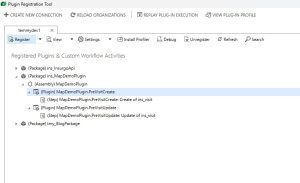
Once the plugins are ready, you also need to register the Plugin Steps!
Canvas App
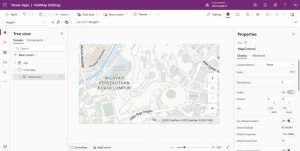
For the Canvas App, I created the below UI:
https://edge.aditude.io/safeframe/1-1-1/html/container.html
Next, on the ScreenMap.OnVisible, I put the code below:
Set(varRecordId, Param("RecordId"));
Set(RecordId, GUID(varRecordId));

Set(CurrentRecord, LookUp(Visits, 'Activity' = RecordId));

ClearCollect(Records, []);

If(
    !IsBlank(CurrentRecord.Longitude) && !IsBlank(CurrentRecord.Latitude),
    Collect(
        Records,
        {
            Long: CurrentRecord.Longitude,
            Lat: CurrentRecord.Latitude,
            Label: "Planning",
            Icon: "Flag-Triangle"
        }
    )
);

If(
    !IsBlank(CurrentRecord.'Actual Latitude') && !IsBlank(CurrentRecord.'Actual Longitude'),
    Collect(
        Records,
        {
            Long: CurrentRecord.'Actual Longitude',
            Lat: CurrentRecord.'Actual Latitude',
            Label: "Actual",
            Icon: "Market-Flat"
        }
    )
);
UpdateContext({showMap: true});
The above code will take the Param(“RecordId”) and get the record from Dataverse. Then, if the Longitude and Latitude data exist (planning), then we will append a new record in the Array that will be set as the data source of the map. And, the same goes for Actual Longitude and Actual Latitude. If the data exists, then we will push that data as “Actual”.
Next, we just need to set:
- Map.Items to the “Records”
- Map.ItemsIcons to “Icon”
- Map.ItemsLabels to “Label”
- Map.ItemsLatitudes to “Lat”
- Map.ItemsLongitudes to “Long”
Once you’re done, you can save and publish the Canvas App. Go to details, and you can get the URL of the Canvas App and store it in an Environment Variable: VisitCanvasAppUrl.
Visit Form
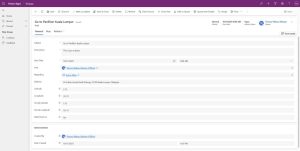
This is the design of the Visit Form on the General tab:
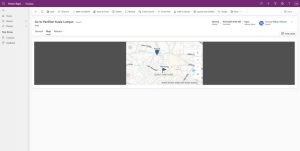
Next, I added a new section with an iframe control to show our Canvas App:
JavaScript
I also created JS with the following logic:
var formVisit = formVisit || {};

(function () {
var getEnvironmentVariable = async function (formContext, name) {
var fetchXml = `

`;
var result = await Xrm.WebApi.retrieveMultipleRecords("environmentvariabledefinition", "?fetchXml=" + encodeURIComponent(fetchXml));
return result.entities.length > 0 ? (result.entities[0]["environmentvariablevalue.value"] || result.entities[0]["defaultvalue"]) : null;
};

var setIFrameSrc = async function (formContext) {
var canvasAppUrl = await getEnvironmentVariable(formContext, "VisitCanvasAppUrl");
if (!canvasAppUrl) return;

var recordId = formContext.data.entity.getId().replace("{", "").replace("}", "");
canvasAppUrl = canvasAppUrl.replace("{RecordId}", recordId);

var iframeControl = formContext.getControl("IFRAME_canvasapp");
if (iframeControl) {
iframeControl.setSrc(canvasAppUrl);
}
};

this.onLoad = async function (context) {
var formContext = context.getFormContext();
// Ensure longitude and latitude are always submitted
formContext.getAttribute("ins_actuallongitude").setSubmitMode("always");
formContext.getAttribute("ins_actuallatitude").setSubmitMode("always");

await setIFrameSrc(formContext);
};

this.checkInVisible = function (formContext) {
var currentUser = Xrm.Utility.getGlobalContext().userSettings.userId;
var userRef = formContext.getAttribute("ins_userid").getValue();
if (!userRef) return false;
if (userRef[0].id.toLowerCase() !== currentUser.toLowerCase()) return false;

var stateCode = formContext.getAttribute("statecode").getValue();
var longitude = formContext.getAttribute("ins_longitude").getValue();
var latitude = formContext.getAttribute("ins_latitude").getValue();
return stateCode === 0 && longitude && latitude;
};

this.checkInSelect = function (formContext) {
if (!navigator.geolocation) return;
navigator.geolocation.getCurrentPosition(function (position) {
formContext.getAttribute("ins_actuallongitude").setValue(position.coords.longitude);
formContext.getAttribute("ins_actuallatitude").setValue(position.coords.latitude);
formContext.data.entity.save();

setIFrameSrc(formContext);
});
};
}).apply(formVisit);
On the form.OnLoad, we will set the IFRAME_canvasapp with the combination of the Environment Variable (VisitCanvasAppUrl) with the current visit RecordId.
Then, we also have 2 other functions for visibility purposes (checkInVisible – will only show if the login user is the User in the Visit record, and we also add some conditions), and when a Salesperson clicks the Check In button (checkInSelect function).
The reason I created a custom ribbon instead of using the Canvas App button is that we are embedding the Canvas App into the MDA. In the eyes of Security, the function that is invoked from the Canvas App is considered CORS (Cross-Origin Resource Sharing). Hence, the easiest way to accomplish this is through JS instead!
Demo
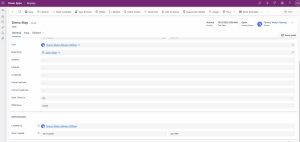
Here is the demo:
Source
Raharjo, T (04/02/2026) Geolocation in Power Apps: Translating Addresses and Validating Check-Ins. Geolocation in Power Apps: Translating Addresses and Validating Check-Ins – Temmy Wahyu Raharjo


