






Default retry settings in Power Automate

Introduction
When actions in Power Automate flows go wrong, they may rerun depending on the failure occurred. One of the errors that may trigger is the 429 Error that is reported when there are throttling issues.
OneDrive for Business connector
In this post I’m using the OneDrive for Business connector as its throttling and retry settings are poor enough to make it easy to reproduce throttling issues. However, the issues described in this post will also be relevant for other connectors.
From the Microsoft documentation we will find that the Throttling limits for this connector are as follows:
| Name | Calls | Renewal Period |
|---|---|---|
| API calls per connection | 100 | 60 seconds |
This means that we can make 100 calls to the connector and every 60 seconds the usage count will reset. So if we make 150 calls within a minute the we will end up with retries.
Now when I run a flow that calls a OneDrive action 150 times, I’m ending up with actions retrying.
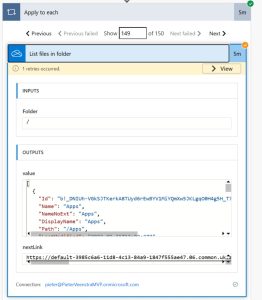
Notice that the single retry is taking 5 minutes to run. This 5 minutes is set as part of the Default Retry policy.
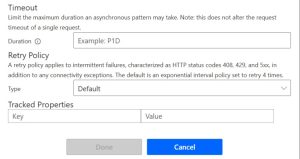
Updating the retry policy to a fixed interval of 1 minute as shown below will change the way the action is retried and speed up our flow.
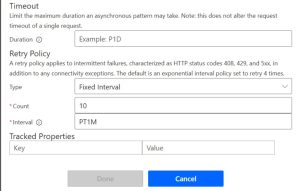
With the retry policy updated, the flow will still show us retries, however the flow will now complete in 1 minute rather than the 5 minutes that we saw earlier.
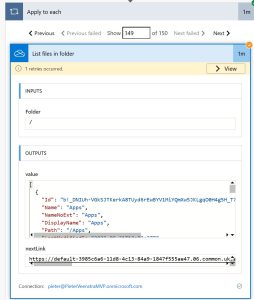
The reason why there is a default retry at 5 minutes after the 429 failure, For Child Flows however this restart time is shorter. But don’t get confused with the actions inside Child flows they of course will have a default retry of 5 minutes.
Thoughts
Having looked at the above two examples. Actions will have a first retry after 5 minutes. For connectors with a renewal period of 60 seconds this could be optimized to 1 minute by changing the retry settings to 1 minute.
Alternately, child flows could be used and set the retry to actions inside the child flows to none.
Source
Veenstra, P (04/02/2026) Default retry settings in Power Automate. Default retry settings in Power Automate


