









SharePoint Framework (SPFx) – Understand the Solution Structure

Contents
Overview
SharePoint Framework (SPFx) client side web parts are lightweight in nature. They can be developed using open source tools such as Node.JS, NPM, Yeoman generators and can be opened in code editors of our choice (Visual Studio Code, Atom, Webstorm). Node Package Manager (NPM) helps to install modules and its dependencies. Yeoman generator carries out the scaffolding and builds the required project structure. In this chapter, we will have a close look at the solution structure of SPFx client side web part and understand major elements of it. Solution Structure In the previous chapter, we developed our first SPFx client side web part. In the command prompt, run below command to open the solution in code editor of your choice.
code .
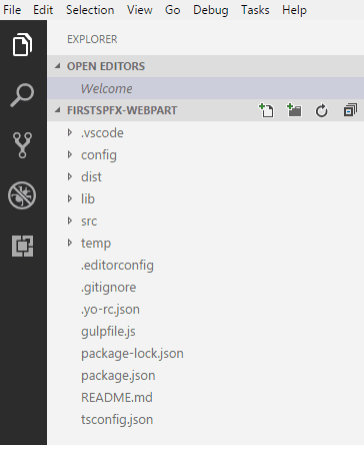
The solution structure consists of various folders and few configuration files at the root. The primary language used is TypeScript (which is a superset of JavaScript). The code mostly uses classes, modules and interfaces written in TypeScript. Major Elements of Solution Web Part Class (HelloWorldWebPart.ts) This defines the entry point of the web part. In our solution, we have only one web part class – HelloWorldWebPart.ts located at src\webparts\helloWorld folder. The web part class extends BaseClientSideWebPart. Each client side web part should extend from BaseClientSideWebPart, which provides basic functioning for web part. Property Type Interface (IHelloWorldWebPartProps) The interface resides in the same web part file. The web part class accepts the property type of interface. This interface is used to define our own custom properties for web part. We can add any of below type of property.
• Button
• Checkbox
• Choice group
• Dropdown
• Horizontal rule
• Label
• Link
• Slider
• Textbox
• Multi-line Textbox
• Toggle
• Custom
The properties can be used in web part as below:
<p class="${ styles.description }">${escape(this.properties.description)}</p>
WebPart Manifest HelloWorldWebPart.manifest.json holds the metadata of web part such as display name, description, icon, version, id.
{
 "$schema": "https://developer.microsoft.com/json-schemas/spfx/client-sideweb-part-manifest.schema.json",
 "id": "a925e124-f0f8-4a26-a797-d384046cf5a7",
 "alias": "HelloWorldWebPart",
 "componentType": "WebPart",
 // The "*" signifies that the version should be taken from the package.json
 "version": "*",
 "manifestVersion": 2,
 // If true, the component can only be installed on sites where Custom Script
is allowed.
 // Components that allow authors to embed arbitrary script code should set
this to true.
 // https://support.office.com/en-us/article/Tu
-scripting-capabilities-onor-off-1f2c515f-5d7e-448a-9fd7-835da935584f
 "requiresCustomScript": false,
 "preconfiguredEntries": [{
 "groupId": "5c03119e-3074-46fd-976b-c60198311f70", // Other
 "group": { "default": "Other" },
 "title": { "default": "HelloWorld" },
 "description": { "default": "HelloWorld description" },
 "officeFabricIconFontName": "Page",
 "properties": {
 "description": "HelloWorld"
 }
 }]
}
Config.json
The configuration file contains the bundling information, the components used in the solution and entry point of the solution. This file also records the exte
al references (for e.g. jQuery) and its dependencies. Also, references to localization resources are stored in this file.
{
 "$schema": "https://developer.microsoft.com/json-schemas/spfxbuild/config.2.0.schema.json",
 "version": "2.0",
 "bundles": {
 "hello-world-web-part": {
 "components": [
 {
 "entrypoint": "./lib/webparts/helloWorld/HelloWorldWebPart.js",
 "manifest":
"./src/webparts/helloWorld/HelloWorldWebPart.manifest.json"
 }
 ]
 }
 },
 "exte
als": {},
 "localizedResources": {
 "HelloWorldWebPartStrings": "lib/webparts/helloWorld/loc/{locale}.js"
 }
}
deploy-azure-storage.json
This file is used while deploying the client-side web part to Azure CDN. This file contains Azure storage account details.
{
 "$schema": "https://developer.microsoft.com/json-schemas/spfx-build/deployazure-storage.schema.json",
 "workingDir": "./temp/deploy/",
 "account": "<!-- STORAGE ACCOUNT NAME -->",
 "container": "spfxcontainer",
 "accessKey": "<!—ACCESS KEY -->"
}
package-solution.json
This file contains solution path configurations.
{
 "$schema": "https://developer.microsoft.com/json-schemas/spfx-build/packagesolution.schema.json",
 "solution": {
 "name": "spfx-helloworld-client-side-solution",
 "id": "41c6825d-8ef2-45e1-b544-5f0d64a480e6",
 "version": "1.0.0.0",
 "includeClientSideAssets": false,
 "skipFeatureDeployment": true
 },
 "paths": {
 "zippedPackage": "solution/spfx-helloworld.sppkg"
 }
gulpfile.js
Defines gulp tasks to run. package.json Defines JavaScript library dependencies. tsconfig.json Defines settings for TypeScript compilation Summary Yeoman generators help to generate SPFx client-side web part solution. The solution has a predefined structure. Each folder and file has its own significance. It is important to understand the role of each file for better development.
If you would like to continue reading download SharePoint Framework (SPFx) – A Developers Guide eBook right here:
var gform;gform||(document.addEventListener(“gform_main_scripts_loaded”,function(){gform.scriptsLoaded=!0}),document.addEventListener(“gform/theme/scripts_loaded”,function(){gform.themeScriptsLoaded=!0}),window.addEventListener(“DOMContentLoaded”,function(){gform.domLoaded=!0}),gform={domLoaded:!1,scriptsLoaded:!1,themeScriptsLoaded:!1,isFormEditor:()=>”function”==typeof InitializeEditor,callIfLoaded:function(o){retu !(!gform.domLoaded||!gform.scriptsLoaded||!gform.themeScriptsLoaded&&!gform.isFormEditor()||(gform.isFormEditor()&&console.wa (“The use of gform.initializeOnLoaded() is deprecated in the form editor context and will be removed in Gravity Forms 3.1.”),o(),0))},initializeOnLoaded:function(o){gform.callIfLoaded(o)||(document.addEventListener(“gform_main_scripts_loaded”,()=>{gform.scriptsLoaded=!0,gform.callIfLoaded(o)}),document.addEventListener(“gform/theme/scripts_loaded”,()=>{gform.themeScriptsLoaded=!0,gform.callIfLoaded(o)}),window.addEventListener(“DOMContentLoaded”,()=>{gform.domLoaded=!0,gform.callIfLoaded(o)}))},hooks:{action:{},filter:{}},addAction:function(o,r,e,t){gform.addHook(“action”,o,r,e,t)},addFilter:function(o,r,e,t){gform.addHook(“filter”,o,r,e,t)},doAction:function(o){gform.doHook(“action”,o,arguments)},applyFilters:function(o){retu gform.doHook(“filter”,o,arguments)},removeAction:function(o,r){gform.removeHook(“action”,o,r)},removeFilter:function(o,r,e){gform.removeHook(“filter”,o,r,e)},addHook:function(o,r,e,t,n){null==gform.hooks[o][r]&&(gform.hooks[o][r]=[]);var d=gform.hooks[o][r];null==n&&(n=r+”_”+d.length),gform.hooks[o][r].push({tag:n,callable:e,priority:t=null==t?10:t})},doHook:function(r,o,e){var t;if(e=Array.prototype.slice.call(e,1),null!=gform.hooks[r][o]&&((o=gform.hooks[r][o]).sort(function(o,r){retu o.priority-r.priority}),o.forEach(function(o){“function”!=typeof(t=o.callable)&&(t=window[t]),”action”==r?t.apply(null,e):e[0]=t.apply(null,e)})),”filter”==r)retu e[0]},removeHook:function(o,r,t,n){var e;null!=gform.hooks[o][r]&&(e=(e=gform.hooks[o][r]).filter(function(o,r,e){retu !!(null!=n&&n!=o.tag||null!=t&&t!=o.priority)}),gform.hooks[o][r]=e)}});
Ebook Download Form
-
-
-
IT ProfessionalDeveloperBusiness Decision MakerEnd UserMakerData ProfessionalTechnology Architect
-
-
-
-
gform.initializeOnLoaded( function() {gformInitSpinner( 59, ‘https://www.sharepointeurope.com/wp-content/plugins/gravityforms/images/spinner.svg’, true );jQuery(‘#gform_ajax_frame_59’).on(‘load’,function(){var contents = jQuery(this).contents().find(‘*’).html();var is_postback = contents.indexOf(‘GF_AJAX_POSTBACK’) >= 0;if(!is_postback){retu ;}var form_content = jQuery(this).contents().find(‘#gform_wrapper_59’);var is_confirmation = jQuery(this).contents().find(‘#gform_confirmation_wrapper_59’).length > 0;var is_redirect = contents.indexOf(‘gformRedirect(){‘) >= 0;var is_form = form_content.length > 0 && ! is_redirect && ! is_confirmation;var mt = parseInt(jQuery(‘html’).css(‘margin-top’), 10) + parseInt(jQuery(‘body’).css(‘margin-top’), 10) + 100;if(is_form){jQuery(‘#gform_wrapper_59’).html(form_content.html());if(form_content.hasClass(‘gform_validation_error’)){jQuery(‘#gform_wrapper_59’).addClass(‘gform_validation_error’);} else {jQuery(‘#gform_wrapper_59’).removeClass(‘gform_validation_error’);}setTimeout( function() { /* delay the scroll by 50 milliseconds to fix a bug in chrome */ }, 50 );if(window[‘gformInitDatepicker’]) {gformInitDatepicker();}if(window[‘gformInitPriceFields’]) {gformInitPriceFields();}var current_page = jQuery(‘#gform_source_page_number_59’).val();gformInitSpinner( 59, ‘https://www.sharepointeurope.com/wp-content/plugins/gravityforms/images/spinner.svg’, true );jQuery(document).trigger(‘gform_page_loaded’, [59, current_page]);window[‘gf_submitting_59’] = false;}else if(!is_redirect){var confirmation_content = jQuery(this).contents().find(‘.GF_AJAX_POSTBACK’).html();if(!confirmation_content){confirmation_content = contents;}jQuery(‘#gform_wrapper_59’).replaceWith(confirmation_content);jQuery(document).trigger(‘gform_confirmation_loaded’, [59]);window[‘gf_submitting_59’] = false;wp.a11y.speak(jQuery(‘#gform_confirmation_message_59’).text());}else{jQuery(‘#gform_59’).append(contents);if(window[‘gformRedirect’]) {gformRedirect();}}jQuery(document).trigger(“gform_pre_post_render”, [{ formId: “59”, currentPage: “current_page”, abort: function() { this.preventDefault(); } }]); if (event && event.defaultPrevented) { retu ; } const gformWrapperDiv = document.getElementById( “gform_wrapper_59” ); if ( gformWrapperDiv ) { const visibilitySpan = document.createElement( “span” ); visibilitySpan.id = “gform_visibility_test_59”; gformWrapperDiv.insertAdjacentElement( “afterend”, visibilitySpan ); } const visibilityTestDiv = document.getElementById( “gform_visibility_test_59” ); let postRenderFired = false; function triggerPostRender() { if ( postRenderFired ) { retu ; } postRenderFired = true; gform.core.triggerPostRenderEvents( 59, current_page ); if ( visibilityTestDiv ) { visibilityTestDiv.parentNode.removeChild( visibilityTestDiv ); } } function debounce( func, wait, immediate ) { var timeout; retu function() { var context = this, args = arguments; var later = function() { timeout = null; if ( !immediate ) func.apply( context, args ); }; var callNow = immediate && !timeout; clearTimeout( timeout ); timeout = setTimeout( later, wait ); if ( callNow ) func.apply( context, args ); }; } const debouncedTriggerPostRender = debounce( function() { triggerPostRender(); }, 200 ); if ( visibilityTestDiv && visibilityTestDiv.offsetParent === null ) { const observer = new MutationObserver( ( mutations ) => { mutations.forEach( ( mutation ) => { if ( mutation.type === ‘attributes’ && visibilityTestDiv.offsetParent !== null ) { debouncedTriggerPostRender(); observer.disconnect(); } }); }); observer.observe( document.body, { attributes: true, childList: false, subtree: true, attributeFilter: [ ‘style’, ‘class’ ], }); } else { triggerPostRender(); } } );} );
You will lea
:
• Overview of SharePoint Framework (SPFx)
• Using JavaScript frameworks with SharePoint Framework
• Deploying SharePoint Framework
• SharePoint operations with SharePoint Framework
About the Author
Nanddeep Nachan is results-oriented Technology Architect with over 13 years’ experience in Microsoft Technologies especially with .NET, MS Azure and SharePoint. He has been working with SharePoint since last 10 years and has exposure to SharePoint versions starting from SharePoint 2007 (MOSS). He is CSM (Certified Scrum Master), as well as Microsoft Certified Professional with certifications in SharePoint, MS Azure, Office 365, and .Net. He is a C# Co
er MVP, Author, and Speaker. He is also a creative, technically sound photographer with experience in custom and specialized photography. Active contributor to Office 365 Dev Patte
s and Practices (https://github.com/OfficeDev/PnP) and C# Co
er (http://www.c-sharpco
er.com)


